Best Otter AI Review in the age of remote work, virtual meetings, and digital content creation, keeping track of spoken conversations has become more essential than ever. Otter AI is an advanced transcription tool powered by artificial intelligence, designed to convert your spoken words into accurate, searchable, and editable text in real-time. Whether you’re attending a lecture, conducting business meetings, or recording interviews, Otter AI promises to simplify the note-taking process and boost your productivity.
Founded in 2016, Otter.ai has rapidly gained popularity for its innovative voice-to-text capabilities, intuitive interface, and seamless integrations with other digital platforms. It’s a solution that appeals to a wide range of users — from students and journalists to business professionals and remote teams.
Why Transcription Tools Matter in Today’s World
With the proliferation of virtual meetings, podcasts, online courses, and remote collaborations, transcription tools have moved from a luxury to a necessity. They save time, reduce the cognitive load of note-taking, and ensure no important detail is missed during conversations.
For businesses, accurate transcriptions improve documentation and compliance. For educators and students, they provide an accessible way to review lectures and discussions. Content creators can repurpose transcripts for blogs, subtitles, or SEO purposes. Overall, transcription tools like Otter AI help you capture information effortlessly and make it easier to share, search, and reference later.
This comprehensive review will explore Otter AI’s core features, pricing, ease of use, and real-world performance. We’ll weigh its strengths and limitations and compare it with competing services. By the end, you’ll have a clear understanding of whether Otter AI is worth your investment of time and money.
Best Otter AI Review: Key Features of Otter AI

Otter AI’s standout feature is its ability to provide real-time transcription. As soon as someone starts speaking, the AI engine converts voice into text on your screen, allowing you to follow along live. This feature is especially handy during meetings and interviews, ensuring you don’t miss key points.
Otter’s transcription accuracy is generally impressive, supported by advanced speech recognition algorithms and machine learning that continuously improves with usage.
One of Otter AI’s useful capabilities is speaker identification. It can distinguish between different speakers in a conversation and label their contributions accordingly, making transcripts much easier to follow. This feature is a boon during multi-person meetings or panel discussions.
Additionally, Otter lets users add custom vocabulary — industry-specific jargon, names, or acronyms — to improve transcription accuracy. This personalization ensures fewer errors and saves time on manual corrections.
Otter AI seamlessly integrates with many popular communication platforms. It works directly with Zoom to provide live captions and automatically transcribe meetings. Similarly, Otter offers integrations with Microsoft Teams and Google Meet, enabling transcription during video calls without interrupting your workflow.
These integrations enhance Otter’s utility, making it a natural extension of your existing tools rather than a standalone app.
After your audio is transcribed, Otter generates a searchable transcript that you can review at any time. You can highlight important sections, add comments, or create custom summaries, making it easier to find and reference critical points later.
This feature is especially helpful for long meetings or lectures where you need to quickly jump to specific parts of the conversation.
Otter AI supports team collaboration by allowing users to share transcripts with colleagues or classmates. Shared transcripts can be viewed, edited, and commented on by multiple users, promoting transparency and teamwork.
This collaborative aspect makes Otter AI a powerful tool for project teams, educators, and remote workers who rely on clear communication.
Ease of Use & User Experience

Setting Up Otter AI for the First Time
Getting started with Otter AI is straightforward. After creating an account, you can begin recording audio directly from the web or mobile app, upload existing recordings, or connect Otter with your Zoom account for automatic meeting transcription.
The setup process involves minimal steps and clear instructions, making Otter accessible even for non-tech-savvy users.
User Interface Overview
Otter AI’s user interface is clean, modern, and intuitive. The main dashboard displays your recent recordings and transcripts, with options to organize notes by folders or tags. The transcript viewer supports easy navigation, allowing you to jump between sections, search keywords, and make edits with simple clicks.
Overall, the UI is designed to keep things efficient and user-friendly without overwhelming you with too many features at once.
Mobile vs. Desktop Experience
Otter AI offers apps for both desktop browsers and mobile devices (iOS and Android). The mobile app is optimized for on-the-go use — you can record interviews, lectures, or meetings directly and access your transcripts anytime.
While the desktop version provides a richer editing and organizational experience, the mobile app retains most core features, including playback, highlighting, and sharing, making it highly convenient for busy professionals and students.
Pricing Plans: What Do You Get?
Free Plan Overview
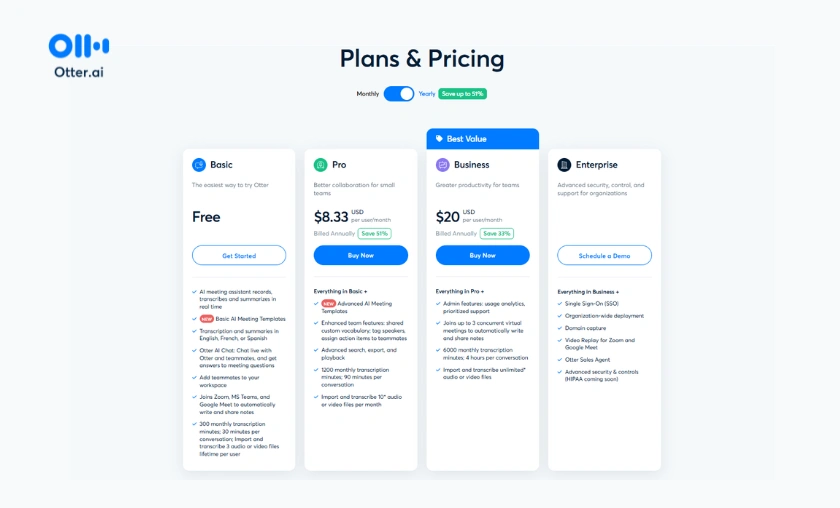
Otter AI offers a free tier that provides users with up to 600 minutes of transcription per month. This plan includes access to basic features like real-time transcription, searchable transcripts, speaker identification, and mobile apps.
The free plan is a great way to test Otter’s capabilities and is suitable for casual users or those with light transcription needs.
Premium & Business Plans Breakdown
Otter AI’s Premium plan costs around $16 per month (billed annually) and expands transcription limits to 6,000 minutes per month. It unlocks advanced features like bulk import, custom vocabulary, and higher quality audio import.
The Business plan is geared toward teams, priced at approximately $30 per user per month. It includes centralized billing, team collaboration tools, live captioning for Zoom meetings, and advanced admin controls.
Is the Pricing Justified by the Features?
Given Otter AI’s powerful capabilities, integrations, and user-friendly interface, many users find the pricing reasonable. The free plan allows enough usage to explore the app, while Premium and Business tiers offer good value for professionals relying heavily on transcription and collaboration.
However, if you only need occasional transcription, the free tier might be enough without additional expense.
Performance & Accuracy

Otter AI delivers high transcription accuracy in quiet environments with clear speech. In professional settings like meetings and interviews, it performs remarkably well, capturing most words correctly with minimal errors.
However, transcription accuracy can decline in noisy environments or with speakers who have strong accents, which is common in voice recognition software.
Otter AI’s machine learning helps it adapt to various accents over time, but initial accuracy depends on audio clarity. Background noise, overlapping speech, or rapid talking can occasionally confuse the AI, resulting in errors.
Its speaker identification helps distinguish voices, but in cases of many speakers or cross-talk, some mislabeling can occur. Using a quality microphone or direct audio feeds can mitigate these issues.
Most users praise Otter AI for saving hours of manual transcription work and enhancing meeting productivity. Students highlight its utility for reviewing lectures, while professionals appreciate the Zoom integration for seamless transcription.
Some users note occasional glitches or transcription errors, especially with technical jargon, but overall satisfaction remains high due to continuous improvements.
Pros & Cons of Otter AI
Use Cases: Who Benefits Most from Otter AI?

Alternatives to Otter AI: How Does It Compare?

Other transcription services like Rev, Temi, and Descript offer varying strengths. Rev provides human-reviewed transcripts for higher accuracy but at a higher cost. Temi offers cheaper automated transcription but with slightly less accuracy. Descript combines transcription with powerful audio/video editing features.
Otter AI stands out for its balance of accuracy, real-time transcription, and collaboration features at a competitive price point.
Choose Otter AI if you want:
If you need near-perfect transcripts for legal or medical purposes, a human-reviewed service might be better.
Conclusion
Otter AI is a powerful and versatile transcription tool, perfect for individuals and teams who regularly attend meetings, lectures, or interviews. It delivers excellent accuracy, especially in quiet settings, and helps boost productivity by automating note-taking and transcription tasks. This makes it a valuable asset for anyone looking to save time and capture important information effortlessly.
What sets Otter AI apart are its integration capabilities and collaboration features. By connecting with popular platforms and enabling easy sharing and editing of transcripts, it becomes an indispensable tool for team workflows. These strengths make Otter AI one of the top contenders in the transcription software market today.
For casual users or students, the free plan provides plenty of value to get started without any cost. Professionals who need more transcription minutes and advanced features will find the Premium plan worth the investment. Meanwhile, teams and enterprises benefit most from the Business plan, which offers enhanced collaboration tools and administrative controls suited for larger groups.
FAQ’s (Frequently Asked Questions)
Currently, Otter AI primarily supports English transcription. While it can recognize some accents and dialects within English, full support for other languages is limited. For multilingual transcription, consider other services.
Otter AI uses industry-standard security measures to protect user data, including encryption and secure servers. However, users should review Otter’s privacy policy and avoid uploading sensitive information if concerned.
No. Otter AI requires an internet connection to process audio and generate transcripts since the AI runs on cloud servers.
Transcripts can be exported in multiple formats, including text, PDF, and SRT (for subtitles). You can download and share these files or integrate them into other workflows like document editing or video captioning.
Yes. Otter AI offers live captioning, especially in Zoom meetings, providing real-time subtitles to improve accessibility and comprehension.
Subscribe to our list
Don't worry, we don't spam
To Read More Similar Articles, Click Here.
Thanks for Visiting Our Website. If You Appreciate Our Work, Kindly Show Us Some Support in Our Comments Section 🙂