
Ergonis is a software company that specializes in developing productivity tools designed to simplify everyday computer tasks and improve digital workflows. Through its official website, ergonis.com, the company offers software solutions that help users type more efficiently, discover special characters, and learn keyboard shortcuts without repeatedly searching through menus. These tools are particularly relevant for people who spend considerable time working on computers, including writers, designers, developers, office professionals, students, and business users. Instead of focusing on a single large application, Ergonis provides specialized utilities that address particular productivity challenges. Its approach appeals to people who want practical software that fits into their existing workflow rather than requiring them to change how they work.
One of the most interesting aspects of Ergonis is its collection of tools designed to reduce small but repeated interruptions during computer use. Typinator helps users automate repetitive typing through customizable text expansions, PopChar makes it easier to find and insert characters from installed fonts, and KeyCue helps users discover keyboard shortcuts for supported applications on macOS. Although these functions may seem simple individually, they can become valuable when used regularly throughout a working day. For example, someone who repeatedly writes customer emails may benefit from reusable text snippets, while a designer working with unusual symbols may appreciate faster access to special characters. Similarly, someone learning a new application can use shortcut-discovery software to become more familiar with its commands.
In this Ergonis AT Review, we explore the company’s software collection, potential benefits, practical applications, purchasing considerations, and overall value for different types of users. The aim is to help readers understand whether these tools could improve their daily productivity and whether purchasing an individual application or a bundled package makes more sense for their needs. We also consider factors such as compatibility, licensing, pricing, software updates, and the learning process involved in adopting new productivity utilities. Ergonis may be especially appealing to people who value efficiency and prefer tools that solve specific problems without unnecessary complexity. However, the best choice ultimately depends on your operating system, work habits, and how frequently you encounter the tasks these applications are designed to simplify.
Ergonis AT Review: Exploring the Software Experience
Ergonis AT Review: Features, Benefits, and Value
Ergonis takes a focused approach to productivity by offering applications that address different aspects of computer use. Rather than attempting to replace established office, design, or communication software, its utilities are intended to complement the programs people already use. This distinction is important because many productivity problems arise not from a lack of powerful software but from repeated small tasks that consume time throughout the day. Remembering shortcuts, inserting unfamiliar characters, and typing the same information repeatedly can interrupt concentration. Specialized tools can reduce these interruptions and make routine work feel more organized. Users who regularly perform such tasks may find more value in dedicated utilities than people who only encounter them occasionally.
Another important consideration is the practical nature of the product collection. Typinator focuses on text expansion, PopChar concentrates on character and font discovery, and KeyCue helps users identify keyboard shortcuts. Each application serves a distinct purpose, allowing customers to choose software according to their specific needs. Someone who writes repetitive emails may have little reason to purchase a character-discovery tool, while a graphic designer may benefit more from PopChar than from text expansion. This specialized structure gives users flexibility, although it also means that customers should understand what each application actually does before purchasing. Reviewing product descriptions and system requirements can help prevent confusion and ensure that a selected tool fits the intended workflow.
The overall value of Ergonis depends on how effectively its applications address real working habits. Users who frequently type repeated information, work with uncommon characters, or navigate complex application menus may experience meaningful convenience from these utilities. However, the benefits are less obvious for people who rarely encounter these challenges or already have satisfactory alternatives. Compatibility is another important factor, as the company’s applications have different platform requirements and should not be assumed to work identically across every operating system. Buyers should also examine the available license types, included updates, and renewal arrangements before committing to a purchase. Overall, Ergonis is worth considering as a provider of focused productivity software, especially for users who want to save time on repetitive computer tasks.
Why People Like Ergonis AT
Ergonis AT Review: Features, Benefits, and Value
One reason users may appreciate Ergonis is that its software addresses common challenges encountered during regular computer use. Typing repetitive information, searching for unfamiliar symbols, and remembering keyboard shortcuts are small tasks that can gradually consume a considerable amount of working time. Specialized utilities can help reduce the effort involved in these activities, allowing users to focus more attention on their main responsibilities. This practical approach is particularly useful for professionals who spend several hours each day writing, editing, designing, or managing digital information. Rather than introducing an entirely new working environment, the tools are designed to support existing habits and make selected activities more convenient.
Ergonis offers separate applications for text expansion, character discovery, and keyboard shortcut assistance. This structure allows customers to focus on the functionality that matters most to them instead of purchasing an extensive software package they may not need. Typinator can be relevant to people who frequently reuse text, while PopChar may suit users who work with special characters and font symbols. KeyCue is aimed at people who want easier access to application shortcuts on macOS. By separating these functions, Ergonis makes it possible to evaluate each product according to a particular requirement. Customers can begin with one application and consider additional tools later if their working habits justify the extra expense.
Repeated tasks can become frustrating when they require users to perform the same actions dozens or hundreds of times. Text expansion is a good example because even a short message can take unnecessary time to type repeatedly throughout the day. Typinator allows users to create abbreviations that expand into longer text, helping streamline recurring writing tasks. Depending on how the software is configured, this approach can support reusable email responses, standard paragraphs, frequently entered details, and other text-based workflows. The actual time saved will vary according to usage, but people who regularly work with repeated text may find that small improvements accumulate into a more efficient routine.
People working in design, publishing, development, and other technical fields sometimes need characters that are not immediately available from a standard keyboard. Finding the correct symbol through conventional menus can interrupt concentration, particularly when the character is unfamiliar or belongs to a particular font. PopChar is designed to make character discovery easier by providing access to symbols available in installed fonts. This functionality can be useful for typography, document formatting, technical writing, and other tasks where character accuracy matters. It may also help users explore available glyphs and understand the symbols associated with different fonts, although the usefulness of the application depends on the characters and fonts required for a particular project.
Ergonis provides different licensing options and package arrangements intended for different kinds of customers. Individual users may prefer a license that supports personal use across their permitted devices, while businesses may need broader usage rights or centralized administration. The company’s productivity bundle brings several applications together, potentially offering better overall value than purchasing each tool separately under comparable plans. However, customers should not assume that every package includes identical features, device allowances, or update entitlements. Comparing the current license descriptions is essential before making a decision. For businesses, it is particularly important to confirm the number of users, permitted installations, support arrangements, and administrative features included in the selected plan.
Ergonis AT Products and Software Collection
Ergonis AT Review: Features, Benefits, and Value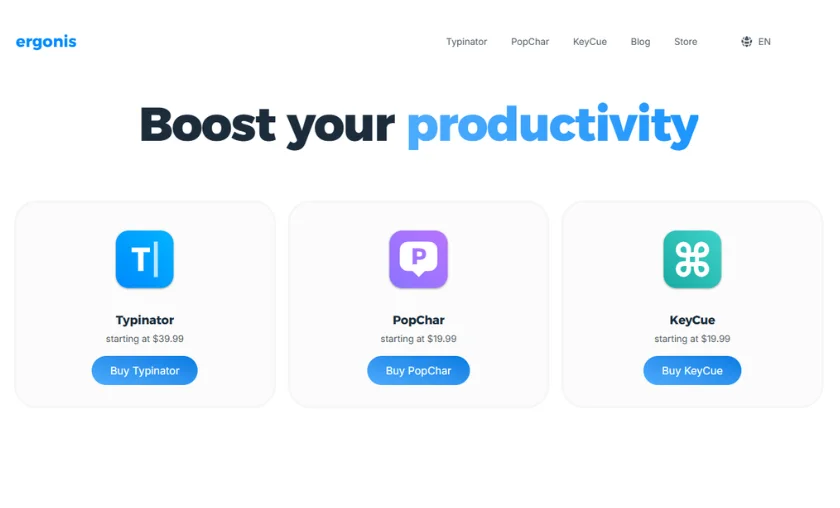
Typinator: A Useful Text Expansion Tool
Typinator is designed to help users reduce repetitive typing by replacing predefined abbreviations with longer text. This can be helpful when writing standard emails, customer support responses, recurring business information, document sections, or other material that appears frequently in daily work. Instead of repeatedly entering the same passage manually, users can create shortcuts that trigger their saved expansions. This approach can improve consistency and reduce the effort required to prepare routine communications. People who work with large volumes of text may find the functionality especially valuable, although the initial setup requires some planning. Users should create clear abbreviations, organize their snippets carefully, and review expansions regularly to ensure that outdated information is not reused accidentally.
PopChar: Faster Access to Special Characters
PopChar is a character-discovery utility intended to help users find and insert symbols from installed fonts. It may be particularly useful for graphic designers, editors, publishers, translators, and professionals who frequently work with typography or specialized written content. Some characters are difficult to locate using a standard keyboard, especially when users do not know the correct keyboard combination or Unicode value. A dedicated character browser can make these symbols easier to explore and select. The application may also be helpful when examining the character sets associated with different fonts. Before purchasing, users should check the current platform requirements and confirm that the software supports the operating system on which they intend to use it.
KeyCue: A Shortcut Discovery Assistant
KeyCue is designed to help macOS users discover keyboard shortcuts and menu commands for supported applications. Learning shortcuts can make computer work more efficient, but remembering every available command is difficult, particularly when using complex professional software. KeyCue aims to reduce this learning barrier by presenting shortcut information in an accessible format. This can help users become more familiar with application features and gradually incorporate useful commands into their regular routines. It may be especially relevant to people who use creative software, office applications, or other menu-heavy programs. However, its compatibility and supported functionality should be checked before purchasing, and customers should remember that the product is intended to complement their applications rather than replace their existing software.
Ergonis Productivity Suite: Multiple Tools in One Package
The Ergonis Productivity Suite combines Typinator, PopChar, and KeyCue under a single package arrangement. This may appeal to people who have several productivity challenges and want access to more than one specialized utility. For example, a professional who writes frequent emails, works with unusual symbols, and regularly uses shortcut-heavy applications could benefit from different tools within the same collection. A bundle may also offer a more economical way to access several products than buying them separately, depending on the available plans and prices. Nevertheless, customers should evaluate each application’s usefulness before selecting the suite. Buying multiple utilities does not automatically provide better value if some of the included functions will rarely be used.
Business and Enterprise Licensing Options
For professional environments, licensing arrangements can be just as important as software features. Ergonis offers business-oriented plans and enterprise arrangements designed to address organizational requirements. Depending on the selected option, these may include different device allowances, centralized license administration, support arrangements, or additional business features. Organizations considering the software should evaluate how many employees need access, which applications each employee requires, and whether the licensing model fits their purchasing policies. It is also sensible to examine the terms governing updates, renewals, and cancellation. Businesses with strict security or compliance requirements should verify the current documentation and obtain confirmation of any specific technical or regulatory requirements before deploying the applications across a team.
Reasons to Choose Ergonis AT
Ergonis AT Review: Features, Benefits, and Value
If your daily responsibilities involve repeatedly writing the same information, a text expansion utility may help simplify your workload. Typinator can be used to create shortcuts for recurring passages, standard responses, and other frequently entered text. This can reduce unnecessary keystrokes and help keep routine communications consistent. The benefit is likely to be greater for people who handle repetitive writing throughout the day than for those who only type occasional messages. Before investing, identify the phrases or paragraphs you reuse most often and consider whether a dedicated application would provide a noticeable improvement over the features already available in your operating system or preferred software.
People who work with typography, multilingual content, mathematical symbols, or unusual glyphs may find character-discovery tools useful. PopChar is designed to make symbols from installed fonts easier to locate, reducing the need to search through unfamiliar menus or remember complex keyboard combinations. This can be convenient when preparing documents, creating visual designs, or working with specialized text. The value of the application depends on how often these characters are needed and whether existing tools already meet the requirement. If you frequently work with a broad range of symbols, exploring a dedicated character browser may be worthwhile.
Keyboard shortcuts can improve productivity by reducing dependence on menus and repeated mouse interactions. However, many applications contain numerous commands, and learning them all at once can be difficult. KeyCue is intended to help macOS users discover shortcuts more conveniently, making it easier to learn commands as they become relevant. This may benefit people who are new to a professional application or who want to improve their working speed over time. Users should still focus on the shortcuts that matter most to their routine rather than trying to memorize everything. A gradual approach can make the learning process more manageable and help turn useful commands into lasting habits.
Ergonis products are designed as productivity utilities rather than replacements for the programs people already use. This makes them potentially attractive to professionals who want to improve selected activities without switching their main applications. A writer can continue using a preferred word processor, a designer can retain an established design environment, and an office employee can maintain existing communication tools while exploring relevant productivity features. Before purchasing, however, it is important to verify that the chosen application supports the intended operating system and workflow. Checking compatibility and testing the available evaluation options, where offered, can help determine whether the software integrates comfortably into everyday work.
Customers who need several productivity functions may benefit from comparing individual licenses with the available Productivity Suite. A package can simplify purchasing and may reduce the combined cost when compared with buying each application separately. On the other hand, a single application may be the better choice for someone who only needs text expansion, character discovery, or shortcut assistance. The decision should be based on actual usage rather than the number of products included in a bundle. Compare the current prices, permitted devices, license terms, update coverage, and renewal conditions before purchasing. This approach makes it easier to select an option that matches both your practical needs and your budget.
Ergonis AT vs Other Productivity Software
Ergonis AT Review: Features, Benefits, and Value
| Feature | Ergonis AT | Typical/Other Tools |
|---|---|---|
| Main Purpose | Offers specialized utilities for text expansion, character discovery, and keyboard shortcut assistance. | May concentrate on a single productivity function or combine several general-purpose features. |
| Repetitive Text | Typinator supports reusable abbreviations and text expansions for recurring typing tasks. | Some tools provide text snippets, templates, macros, or basic text replacement. |
| Character Discovery | PopChar helps users explore and insert characters from installed fonts. | Alternatives may rely on operating-system character viewers or application-specific symbol menus. |
| Keyboard Shortcuts | KeyCue helps macOS users discover shortcuts and menu commands. | Some alternatives provide shortcut lists, tutorials, or limited shortcut overlays. |
| Product Selection | Offers separate applications for different productivity needs and a combined suite. | May provide individual applications, broader productivity platforms, or bundled subscriptions. |
| Workflow Integration | Designed to complement existing computer applications rather than replace them. | Integration varies depending on whether the software is a system utility, browser extension, or standalone application. |
| Platform Compatibility | Each application has its own supported platforms and system requirements. | Compatibility ranges from single-platform utilities to broader cross-platform services. |
| Licensing Choices | Provides individual and business-oriented licensing options, with terms depending on the selected product or plan. | May use subscriptions, one-time purchases, usage-based plans, or free tiers. |
| Business Administration | Selected business and enterprise plans may offer centralized license administration and organizational features. | Business administration capabilities vary considerably by provider and plan. |
| Best-Suited Users | May suit people who frequently type repeated text, work with special characters, or learn application shortcuts. | May be better for users seeking different functions, broader collaboration, or an alternative pricing model. |
Overall, Ergonis may be a suitable choice for people who prefer specialized productivity utilities that solve clearly defined problems. Its main appeal is the ability to select tools according to specific working habits rather than adopting an entirely new productivity platform. However, alternatives may be more suitable when users require a particular integration, wider operating-system support, extensive team collaboration, or a different licensing structure. Before purchasing, compare the functionality you actually need with the features already available in your existing software. A focused tool can be valuable when it addresses a recurring problem, but additional software is not always necessary when a built-in feature already provides a satisfactory solution.
How Ergonis Software Works
Ergonis AT Review: Features, Benefits, and Value
Ergonis software is designed to make selected computer activities more efficient by reducing repetitive actions and improving access to useful commands or information. The exact process differs between its applications, but the overall idea is to make common tasks easier to perform within an existing digital workflow.
Shopping Tips for Ergonis AT
Ergonis AT Review: Features, Benefits, and Value
Before purchasing productivity software, it is important to understand what the application offers, which systems it supports, and how the license works. The following tips can help you choose an Ergonis product that fits your needs.
1. Identify Your Main Productivity Problem
Start by identifying the task that takes up unnecessary time in your daily routine. If you repeatedly type similar messages, Typinator may be the most relevant option. If you often search for uncommon characters, PopChar may better suit your requirements. If you want to learn shortcuts in macOS applications, KeyCue may be worth considering. Choosing according to a specific need makes it easier to judge whether the software offers meaningful value. It also reduces the likelihood of purchasing a product simply because it has interesting features that you may never use. A clear list of your most frequent tasks can help guide the decision.
2. Check Operating-System and Application Compatibility
Compatibility should be confirmed before any purchase or installation. Ergonis applications have different platform requirements, so customers should not assume that every product works on every computer or operating system. Review the current product page for the supported operating-system versions, device requirements, and any application-specific limitations. If you rely on a particular professional program, confirm that the selected utility works appropriately within your intended workflow. Checking compatibility is especially important when using older computers or newly released operating-system versions. Taking a few minutes to verify these details can help prevent avoidable installation problems and disappointment after purchasing.
3. Compare Individual Licenses with the Productivity Suite
If you need more than one Ergonis application, compare the cost of separate licenses with the current Productivity Suite offering. A bundle may provide better value when you regularly use several included products, but it may be unnecessary if you only need one function. Consider how often you will use each application, which devices need access, and whether the package includes the features you expect. It is also worth checking whether the chosen license covers private or business use, since the available terms may differ. Evaluate the total cost and practical benefits rather than choosing a bundle solely because it includes more software.
4. Review Updates, Renewals, and License Conditions
Software pricing is only one part of the purchasing decision. You should also understand whether the selected plan is a one-time purchase or subscription, how renewals are handled, and which updates are included. Some products or plans may treat major-version upgrades differently from routine maintenance updates. Customers should review the current licensing information to understand what happens when a new version is released or a subscription is cancelled. Business buyers should also check the permitted number of users and devices. Clear knowledge of these conditions makes it easier to estimate long-term costs and avoid misunderstandings about future access.
5. Evaluate Support, Documentation, and Security Needs
Before committing to a software tool, review the available documentation and support options. Helpful instructions can make installation and configuration easier, particularly for users who are unfamiliar with text expansion or shortcut-discovery software. If you plan to use the applications for professional tasks, consider how you would resolve a technical issue or restore your settings if necessary. Users handling confidential business information should also examine the relevant privacy and security documentation rather than assuming that all utilities process data in the same way. Businesses with formal security requirements may need additional confirmation about licensing, data handling, and compliance before deploying software across an organization.
The Story of Ergonis
Ergonis AT Review: Features, Benefits, and Value
Ergonis is a software company associated with the development of productivity utilities for computer users. Its product collection reflects a focused approach to software design: rather than trying to cover every aspect of digital work, the company addresses specific tasks that can interrupt an otherwise efficient workflow. Text expansion, character discovery, and keyboard shortcut assistance are different functions, but they share a common purpose of reducing unnecessary effort. These activities may appear minor when considered individually, yet they can become significant for people who perform them repeatedly throughout a working day. The company’s approach is therefore relevant to users who want practical improvements in their existing work environment.
The development of specialized utilities also reflects a broader need for tools that complement established software. Many professionals already have preferred applications for writing, design, communication, and technical work. Replacing these programs is not always practical, particularly when teams have established processes or rely on particular file formats and integrations. Focused utilities can provide an alternative approach by improving selected tasks without requiring users to rebuild their entire workflow. Typinator, PopChar, and KeyCue represent different applications of this idea. Their usefulness depends on the user’s habits, but the shared objective is to make recurring computer interactions more convenient and efficient.
As operating systems and professional applications evolve, productivity software must also remain compatible with changing technical requirements. Updates, licensing arrangements, support resources, and platform compatibility all influence whether a tool remains useful over time. For this reason, customers should evaluate not only the immediate features of an Ergonis product but also the current requirements and terms associated with it. The company provides a collection of focused utilities that may appeal to people who value time savings and practical functionality. For prospective buyers, the most sensible approach is to identify a recurring problem, examine the relevant application, and compare its benefits with the alternatives already available.
Ergonis AT Customer Reviews
Ergonis AT Review: Features, Benefits, and Value
Conclusion
Ergonis is worth considering for people who want specialized software to make selected computer tasks easier and more efficient. Its collection focuses on practical functions such as automating repetitive text, locating characters from installed fonts, and discovering keyboard shortcuts. These capabilities may be useful for writers, office professionals, designers, developers, and other users who regularly encounter the challenges addressed by the applications. The main attraction is the opportunity to improve existing workflows without replacing the main programs used for everyday work. For people who repeatedly perform these tasks, even modest time savings can make a dedicated utility worth exploring.
However, the value of Ergonis depends on individual requirements rather than the number of features offered. Someone who frequently writes repeated messages may benefit from Typinator, while a person who works extensively with typography may find PopChar more relevant. KeyCue may be useful for macOS users who want to discover shortcuts and become more familiar with their applications. Customers who need several of these functions can compare the Productivity Suite with individual licenses to determine which option makes financial sense. Compatibility, licensing, update coverage, and the distinction between personal and business plans should all be reviewed before purchasing.
Overall, Ergonis AT may be a suitable option for users who appreciate focused productivity tools and want to reduce the effort involved in routine computer tasks. Its software collection is most compelling when a particular application solves a recurring problem that existing tools do not adequately address. It may be less valuable for users who rarely need text expansion, character discovery, or shortcut assistance, or whose current software already meets those needs. Before making a purchase, identify the function you need most, check the latest product specifications, and compare the available license options. This approach will help you decide whether Ergonis offers a practical improvement to your workflow and represents good value for your budget.
FAQ’s (Frequently Asked Questions)
Ergonis is a software company that develops productivity utilities designed to make certain computer tasks more efficient. Its main products include Typinator for text expansion, PopChar for discovering and inserting special characters, and KeyCue for helping macOS users find keyboard shortcuts. The applications address different needs, so customers can choose a product according to their working habits. Before purchasing, users should check the current product descriptions, supported operating systems, and licensing terms to confirm that the software is appropriate for their requirements.
Ergonis offers Typinator, PopChar, and KeyCue, along with a Productivity Suite that combines the three tools under a bundled licensing arrangement. Typinator helps users automate repeated typing through customizable text expansions, PopChar assists with finding characters in installed fonts, and KeyCue helps macOS users discover keyboard shortcuts. The suite may be suitable for people who regularly use several of these functions, while an individual product may be sufficient for someone with a more specific requirement. Customers should compare the current features and prices before selecting an option.
Ergonis may be suitable for business users who want to reduce repetitive typing, work more efficiently with specialized characters, or learn application shortcuts. These capabilities can be relevant to customer service teams, writers, administrative professionals, designers, and other people who use computers extensively. The company also offers business-oriented licensing options, although the features and terms depend on the selected plan. Organizations should confirm the permitted number of users and devices, available administration features, support arrangements, and security requirements before adopting the software across a team.
The best product depends on the task you want to improve. Typinator is the most relevant starting point if you repeatedly type the same phrases or longer passages. PopChar may be a better fit if you frequently search for symbols or characters from installed fonts, while KeyCue is designed for macOS users who want easier access to keyboard shortcuts. If you need several of these functions, compare the Productivity Suite with separate licenses. It is also important to review compatibility, pricing, update coverage, and license conditions before making a final decision.
Ergonis may offer good value for people who regularly encounter the tasks its applications are designed to simplify. The potential benefits include reduced repetitive typing, easier access to specialized characters, and more convenient discovery of keyboard shortcuts. However, the value depends on how often you use these features, whether your existing software already provides similar functionality, and which license you choose. Comparing current prices, included features, device limits, renewal terms, and available alternatives can help you determine whether the expected productivity improvements justify the cost.
Subscribe to our list
Don't worry, we don't spam
To Read More Similar Articles, Click Here.
Thanks for Visiting Our Website. If You Appreciate Our Work, Kindly Show Us Some Support in Our Comments Section 🙂